
iFrame Embed Integration
Embed your AI agent directly into websites using HTML iframe code
iFrame Embedding
iFrame embedding allows you to integrate your AI agent directly into any website as a seamless part of the page content. This method provides full control over sizing, positioning, and integration with your existing web design.
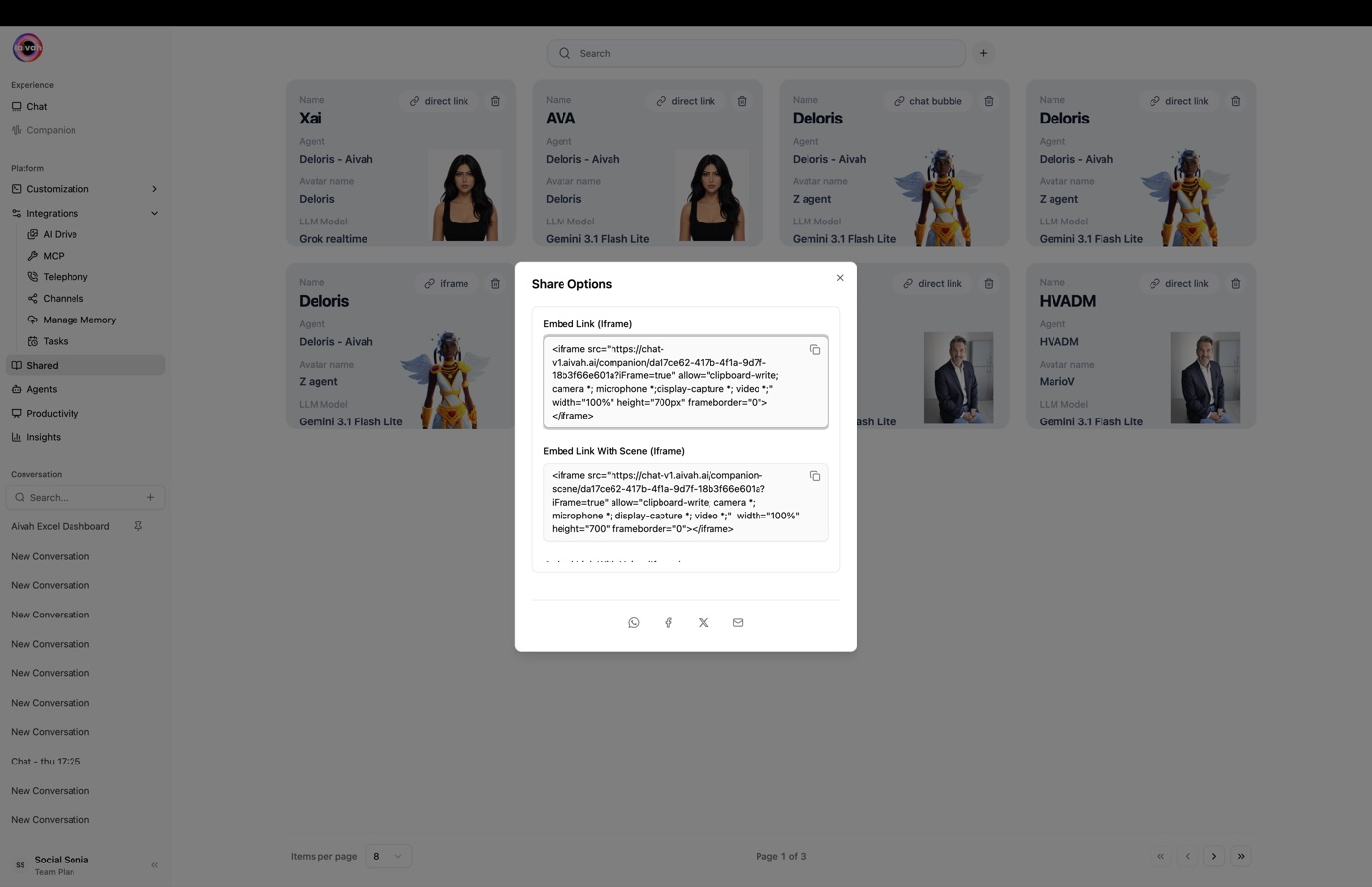
How iFrame Embedding Works
Direct Integration
- Native Feel: Agent appears as part of your website's content
- Custom Sizing: Control exact dimensions to fit your layout
- Responsive Design: Adapts to different screen sizes and devices
- Flexible Positioning: Place anywhere within your page structure
Technical Implementation
- HTML Standard: Uses standard HTML iframe element
- Cross-Domain: Securely loads content from Aivah servers
- Modern Browsers: Compatible with all current web browsers
- Mobile Responsive: Automatically adjusts for mobile devices
iFrame Code Structure
Basic iFrame Code
The platform generates HTML iframe code that you can embed directly:

<iframe src="https://chat.aivah.ai/companion/9d9d5abe-7272-4792-8e3f-ee4118b38303?type=face-focus&frame=true"
        allow="clipboard-write; camera *; microphone *; display-capture *; video *;"
        width="100%"
        height="700"
        frameborder="0">
</iframe>
Scene-Specific iFrame
For specific visual environments:
<iframe src="https://chat.aivah.ai/companion-scene/9d9d5abe-7272-4792-8e3f-ee4118b38303?type=face-focus&frame=true"
        allow="clipboard-write; camera *; microphone *; display-capture *; video *;"
        width="100%"
        height="700"
        frameborder="0">
</iframe>
Configuration Parameters
URL Parameters
- type=face-focus: Display mode for the agent
- frame=true: Optimizes the interface for iframe embedding
- scene=[ID]: Specific background scene selection
HTML Attributes
- allow: Permissions for camera, microphone, and other features
- width: Control horizontal dimensions (pixels or percentage)
- height: Set vertical space allocation
- frameborder: Remove default iframe borders
Permission Settings
The allow attribute enables:
- clipboard-write: Text copying functionality
- camera: Video chat capabilities
- microphone: Voice input and output
- display-capture: Screen sharing features
- video: Video playback support
Responsive Design
Flexible Sizing
<iframe src="[YOUR-AGENT-URL]"
        width="100%"
        height="600"
        style="min-height: 500px; max-width: 800px;">
</iframe>
Mobile Optimization
<iframe src="[YOUR-AGENT-URL]"
        width="100%"
        height="500"
        style="min-height: 400px;">
</iframe>
Advanced Responsive CSS
.agent-iframe {
    width: 100%;
    height: 60vh;
    min-height: 400px;
    max-height: 800px;
    border: none;
    border-radius: 8px;
}
Integration Best Practices
Page Layout Considerations
- Sufficient Space: Ensure adequate height for comfortable interaction
- Visual Hierarchy: Position prominently but not overwhelmingly
- Loading States: Provide feedback while iframe content loads
- Fallback Content: Include alternative text for accessibility
Performance Optimization
- Lazy Loading: Use
loading="lazy"for below-the-fold iframes - Resource Management: Monitor impact on page load times
- CDN Benefits: Leverage Aivah's content delivery network
- Caching Strategy: Implement appropriate caching headers
Common Use Cases
Help Centers
- Documentation Pages: Embed alongside help articles
- FAQ Sections: Provide interactive assistance with written FAQs
- Tutorial Pages: Offer guided help during complex processes
- Support Portals: Central location for customer assistance
Product Pages
- Product Demos: Interactive demonstrations of features
- Configuration Help: Assist with product customization
- Pricing Questions: Answer questions about costs and options
- Technical Support: Provide specialized product assistance
Landing Pages
- Lead Qualification: Pre-qualify visitors before sales contact
- Information Gathering: Collect visitor preferences and needs
- Immediate Assistance: Reduce bounce rates with instant help
- Conversion Optimization: Guide visitors toward desired actions
Styling and Customization
CSS Integration
.agent-container {
    padding: 20px;
    background: #f8f9fa;
    border-radius: 12px;
    box-shadow: 0 4px 6px rgba(0, 0, 0, 0.1);
}

.agent-iframe {
    width: 100%;
    height: 600px;
    border: none;
    border-radius: 8px;
}
Context Integration
- Brand Alignment: Ensure agent appearance matches your brand
- Content Harmony: Choose backgrounds that complement your site
- User Experience: Maintain consistent interaction patterns
- Visual Flow: Guide users naturally to and from the agent
Security Considerations
Content Security Policy
Ensure your CSP allows iframe embedding from Aivah domains:
frame-src https://chat.aivah.ai/;
Privacy Compliance
- Data Handling: Understand how user interactions are processed
- Cookie Policies: Consider impact on your site's cookie usage
- GDPR Compliance: Ensure alignment with privacy regulations
- User Consent: Implement appropriate consent mechanisms
Technical Troubleshooting
Common Issues
- Height Problems: iframe too short or too tall for content
- Mobile Display: Poor appearance on mobile devices
- Permission Errors: Microphone/camera not working
- Loading Issues: Slow or failed iframe loading
Solutions
- Dynamic Sizing: Use JavaScript to adjust iframe height
- Mobile Testing: Test thoroughly on various devices
- Permission Debugging: Check browser console for errors
- Network Optimization: Monitor loading performance
Analytics and Monitoring
Usage Tracking
- Interaction Metrics: Monitor user engagement with embedded agent
- Performance Monitoring: Track loading times and error rates
- Conversion Impact: Measure effect on business goals
- User Feedback: Collect satisfaction data
A/B Testing
- Placement Testing: Try different positions on your pages
- Size Optimization: Test various iframe dimensions
- Content Variations: Compare different agent configurations
- Performance Comparison: Measure against other support methods
iFrame embedding provides the most integrated experience for your AI agent while maintaining full control over presentation and user experience.