 Help Center
Use this guide when conversation titles are difficult to find or a private test is no longer needed. You will organize history without accidentally removing the wrong work.
Before you begin
Open the conversation area and expand the lower part of the left navigation. Know the purpose or approximate date of the conversation you need.
Steps
1. Search by conversation name
Use conversation search to narrow the history. Conversations can also be grouped by date, so check the relevant group when the search is broad.
2. Open and verify the conversation
Read enough of the transcript to confirm the employee, purpose, and date. Do not rely on a generic automatically created title.
3. Rename unclear titles
Open the conversation actions menu and use the rename action. Choose a name that includes the purpose and, when useful, the date—for example, “Pricing Test – July 10.”
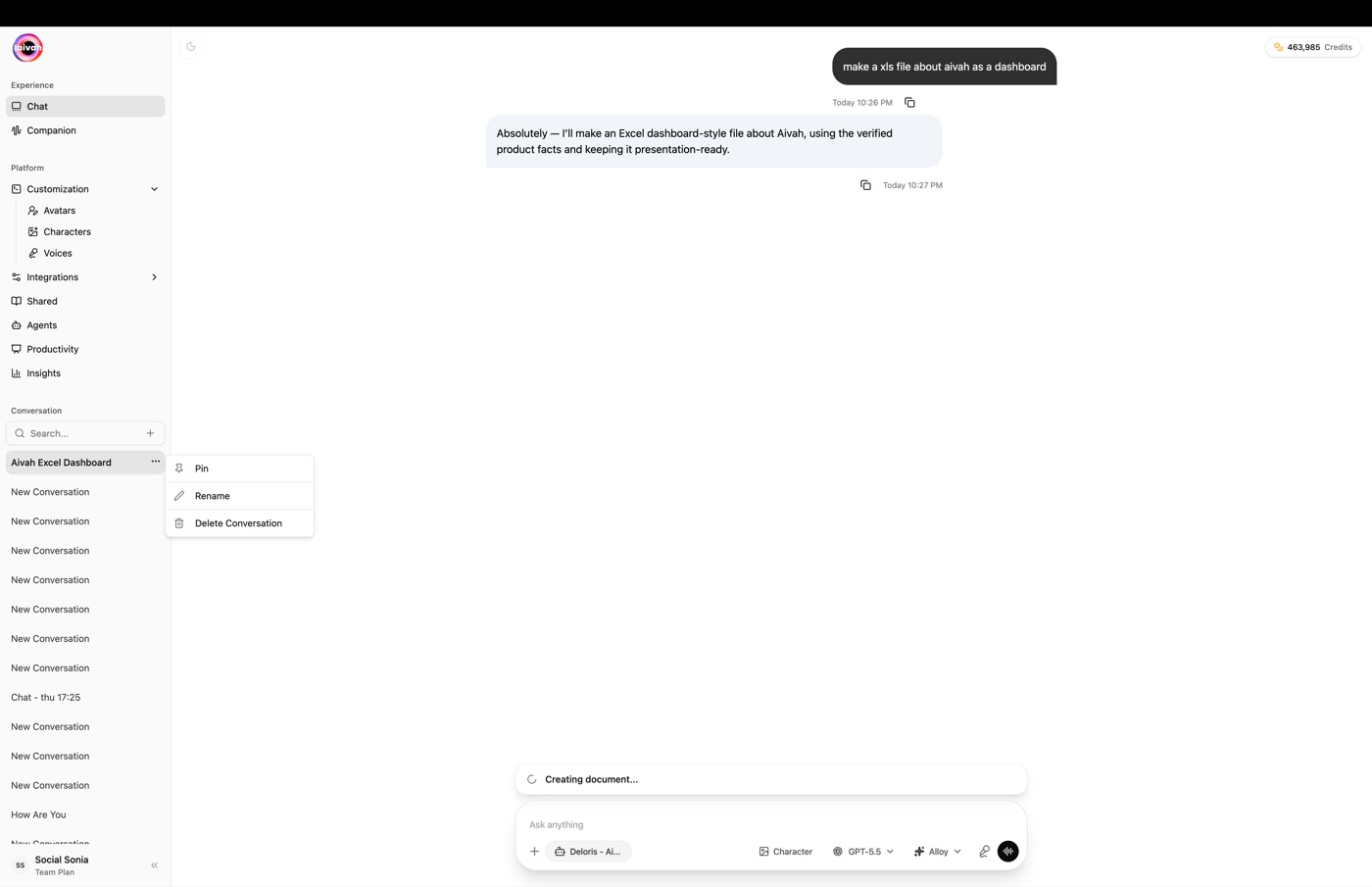
4. Pin important conversations
Use the pin action for active tests, approved examples, or work you need to revisit. Pinning makes the item easier to find but does not change its content.
5. Start a separate conversation for a new test
Choose New chat when changing the employee, test purpose, or source version. This keeps results and generated work easier to attribute.
6. Delete only after confirming
Open the actions for the verified conversation, use the delete action, and check the name before confirming.
Expected result
Important conversations have descriptive names and are pinned when needed. New test purposes use separate conversations, and only verified, no-longer-needed history is deleted.
Status meanings
Conversation organization has no separate completion status. A renamed conversation shows its new name, a pinned conversation appears in the pinned area, and a deleted conversation disappears from history. If the view does not update, refresh once and confirm the conversation before repeating a permanent deletion.
Usage credit impact
Searching, pinning, renaming, and deleting history do not start a new conversation response. The guide does not define any charge for these organization actions. New messages and other supported activity may use usage credits.
Information stored or shared
Conversation history contains the messages and supported content associated with that conversation. Renaming and pinning change how it is organized in your workspace; they do not publish it to visitors.
Limits and permanent actions
Deletion is permanent. Confirm the title and transcript before deleting. If a conversation contains an approved example or information your organization is entitled to retain, handle it according to your organization's records process before removal.
Common problems and recovery
- Search misses the conversation: clear the search, review date groups, and try a word from the renamed purpose.
- Two conversations have similar names: open each transcript and add a date or employee name.
- A test seems to use the wrong employee: start New chat, select the intended Agent, and repeat it in the new conversation.
- A conversation was deleted: the current guide provides no restore workflow; contact support with the approximate time without sending private conversation content.
Next step
Return to Use Playground for the next test, or follow Manage, test, and improve to revise the employee.